
Short answer
Open the quoted page, select the words, and choose Copy or Cite. Check the printed number shown on the page before you accept it. The number printed on the paper can differ from the page position shown by the PDF reader.
This guide covers CiteFlow. Check requirements and download options before you begin.
On this page
When to use this method
Use this method when a citation needs the number printed on the page. Covers and introductory pages can make PDF position 12 appear as printed page 1.
Before you start
Add the PDF to a CiteFlow project. Open the page that contains the passage. A PDF position is the page's place inside the file. A printed page label is the number or Roman numeral visible on the page. Check which one your citation style asks for.
Technical note Confirmed behavior and an important limit.
- What we confirmed
- The page detector combines PDF labels, plausible margin evidence and saved mappings. It preserves uncertainty rather than proving that every visible number is pagination.
- Important limit
- PDF position 12 can be printed page 1 after eleven cover and front-matter pages. Cite the visible publication page when the style requires it, while retaining the PDF position for return navigation.
Keep two locators when they differ
A journal excerpt can show printed page 519 at PDF position 3. The citation may need 519, while the reader needs position 3 to reopen the page. Keep both values and check the neighboring printed pages. Do not substitute the file position when the printed number is missing; record that uncertainty.
Check and save the printed page number
-
Open the passage in CiteFlow
Open the PDF and select the exact words you plan to use. You should see the selected text highlighted on the page.
-
Choose Copy or Cite
Choose Copy for the selected passage with its citation, or Cite for the citation alone. If CiteFlow cannot confirm the printed label, you should see Page Number Needed. The passage can be saved in Citation History while source details still need review. Complete that review before using the final citation.
-
Compare the suggestion with the page
Read the number printed at the top or bottom of the page. Check the page before and after it. You should see a sequence that makes sense, such as 10, 11, 12.
-
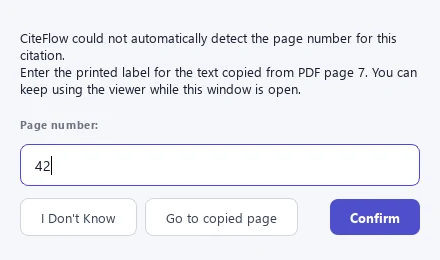
Confirm or correct the label
Enter the label exactly as printed, including a Roman numeral such as iv. Choose I Don't Know when no label is visible or readable. Do not reuse one offset when the document changes from Roman to Arabic numbers.
-
Reopen the finished citation
Read the saved locator and excerpt in Citation History, then reopen the source from the project library and navigate to the PDF position you recorded. The history card does not open the page. Keep the PDF position in a PDF note or your own research notes; the citation locator alone can be a different number. Compare the reopened passage and printed label before submission.
Locator errors
- Using PDF position as printed pagination without checking
- Applying one offset across Roman and Arabic sections
- Trusting a number or mark that OCR misread on a scanned page
- Citing a page label that cannot be reopened
Checkpoint: Pagination checks
- Record the PDF position.
- Read the visible printed label.
- Check the neighboring sequence.
- Reopen the final cited locator from the note.