
Short answer
A Smart Collection is a saved set of rules. It does not move or duplicate your clipboard items.
Choose where to search and what should match. The first exercise below finds links from one website.
This guide covers Osenpa Clipboard Manager. Check requirements and download options before you begin.
On this page
When to use this method
Use a Smart Collection for a repeated query, such as "recent links from my browser." Use a Favorite category to arrange lasting items manually, or a pin when one history item must survive cleanup.
Build one simple collection first
-
Copy one safe test link
Copy
https://example.com/guide-test. Press Alt+V. You should see a new link card for example.com in History. -
Create the collection
Select the Collections tab. Choose New collection. Name it
Example links. You should see the rule editor with the new name at the top. -
Choose where to search
Set Search in to Clipboard history. This tells the collection to search captured history instead of Favorites.
-
Add two rules
Expand Advanced rules. Set Content type to Link and enter
example.comin Link domain. Set Rule matching to Match all rules. You should see both populated fields in the editor. The domain rule matches text within a saved link, so check the actual hostname before opening a result.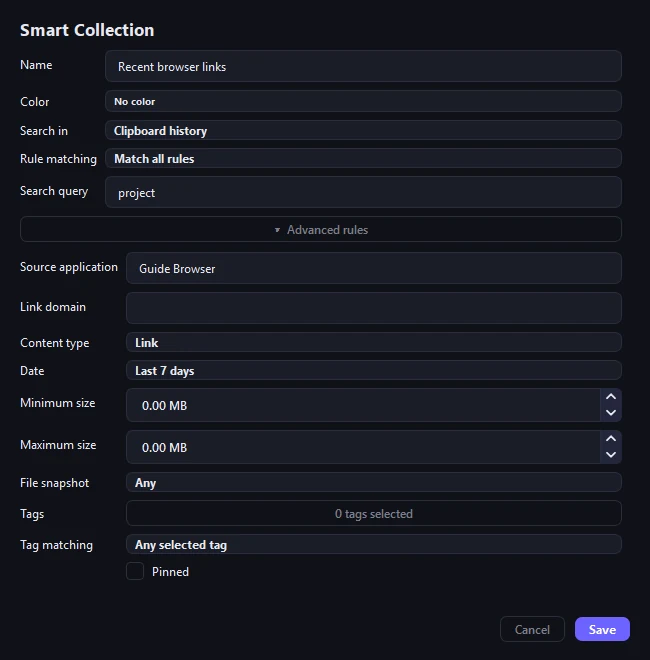
This saved example uses a project search, a browser source and Last 7 days. For the exercise above, use Link type and enter example.com in Link domain. Choose only the rules your question needs. -
Save and open it
Select Save. Open
Example links. You should see the test link and no unrelated text or image cards. Copy a plain sentence as a second test; it should remain in the Clipboard tab and stay outside this Link-only collection.
Smart Collection behaviorRule behavior, live membership and the difference from a stored copy.
- Available rules
- Rules can match source, domain, type, date, size, tags, pin state and snapshot state. Results update when a matching clip changes.
How Smart Collections workOpen this to learn what a saved collection changes and what it leaves alone.
Understand what a collection can and cannot do
-
It remembers a question
The collection stores a name, scope and rules. Opening it shows current History and Favorite items that match.
-
It does not make a protected copy
A regular history item can disappear from a collection because its tag changed or because cleanup deleted the underlying item. Collection membership alone does not pin, favorite, snapshot or encrypt anything.
-
Deleting the collection is safe for its results
Editing or deleting a Smart Collection changes only the saved query. It does not delete the History or Favorite items that appeared in the results.
Build a more specific collectionUse these rule-building steps after the first example works.
Turn a recurring query into a view
-
Define one retrieval purpose
Build on the example above with a specific question, such as "Links from example.com copied this week." Name the collection after that question.
-
Choose the collection scope
Switch from History to Favorites or Both only when the query needs those records. A Favorite is a separate snapshot, so related items can appear in both places.
-
Add the narrowest useful rules
Start with the strongest fact you know: a text term or exact phrase, source application, content type, date, tag, link domain, item size, pin or Favorite state, or whether a copied file has a snapshot. You can also use the advanced search query. Add a second rule only when the first produces a known false match.
-
Save and inspect membership
Choose All when every rule must be true. Choose Any when one matching rule is enough. Save, read the result count, and open at least one expected item and one surprising item. Item details shows the metadata needed to explain why it matched.
-
Change one test item
Use harmless test data. Add or remove a tag, change a pin, or create a link with the chosen domain. Confirm that the result enters or leaves the view without being duplicated or deleted.
More collection examplesSee three rule patterns for links, project material and copied files.
Build rules that answer one clear question
-
Recent links from one source
Scope the collection to History, require the Link type, select a source application and add a date condition. Add a domain only if links from that source are still too broad.
-
Reusable project material
Scope it to Favorites and require the project tag. Add a content type only if the collection is meant to contain, for example, images rather than every tagged Favorite.
-
Copied files with safe local recovery
Require the File type and snapshot state. This finds records whose bytes were copied into local snapshot storage. It does not prove the snapshot is current, so inspect the file card before restoring or sharing it.
Collection assumptions
- Combining All rules until no item can match
- Using Any when every condition was intended to be required
- Using a broad domain or source label without inspection
- Assuming rule membership protects an item from cleanup
Checkpoint: test membership
- Explain the rule in one sentence.
- Verify one expected member and one excluded clip.
- Change a test property and observe membership.
- Confirm the original history item remains the same record.
- Confirm All rules or Any rule reflects the intended logic.
- Delete a disposable test collection and confirm its matching items remain in History or Favorites.
If a Smart Collection is empty
Open the rules and read them as one sentence. Temporarily remove the last rule you added, check whether All or Any is selected, and make sure the collection searches the right part of the app.
Inspect a candidate item's source, type, date, tags, domain, size, and snapshot state. A collection cannot restore an item that retention already removed. Recovery requires an existing backup or Favorite.