
Short answer
Open Settings > System > Storage to see which kind of content is using space. If you already know the folder, open it in File Explorer, switch to Details and sort its files by Size.
For a drive-wide view of individual files and folders, scan the nearly full drive with Osenpa Disk Analyzer. When the results appear, start with the largest items and check what each belongs to before changing anything.
This guide covers Osenpa Disk Analyzer. Check requirements and download options before you begin.
On this page
What is taking up space on the C drive?
Scan C if Windows says that drive is nearly full. If the warning concerns another drive, select that one instead. Reading the results does not require deleting anything: first identify the files or folders behind the total.
Before you start
Connect the drive and note its free space. Let large downloads or copies finish so the numbers are easier to compare. Keep a backup of irreplaceable files before making changes.
Search limits and deletion safety What the filters show and why every large item still needs review.
- How it works
- The app can show large, old, video, game and archive candidates or search names. Name search displays the first 2,000 matches while reporting the real total separately.
- Important limit
- A large item can be active application data, a virtual machine, mail archive, backup or game. Size does not make it safe to remove.
Start with the view that answers your question
Windows Storage can help when the space belongs to installed apps or temporary files. File Explorer can sort the files in a known folder, but its Size column does not show the total size of each folder. Use a drive scan when you still need that wider picture.
Microsoft's drive-space guide explains the built-in options. Record the same drive's free space before and after an action; moving a file to the Recycle Bin alone may not reclaim its occupied space.
Find one large file or folder
-
Scan the right drive
Open Osenpa Disk Analyzer and choose Scan on the drive that is low on space. Use Scan All only when you need several drives. Keep the drive connected and wait for the results to appear automatically. Check whether any locations were skipped or could not be read.
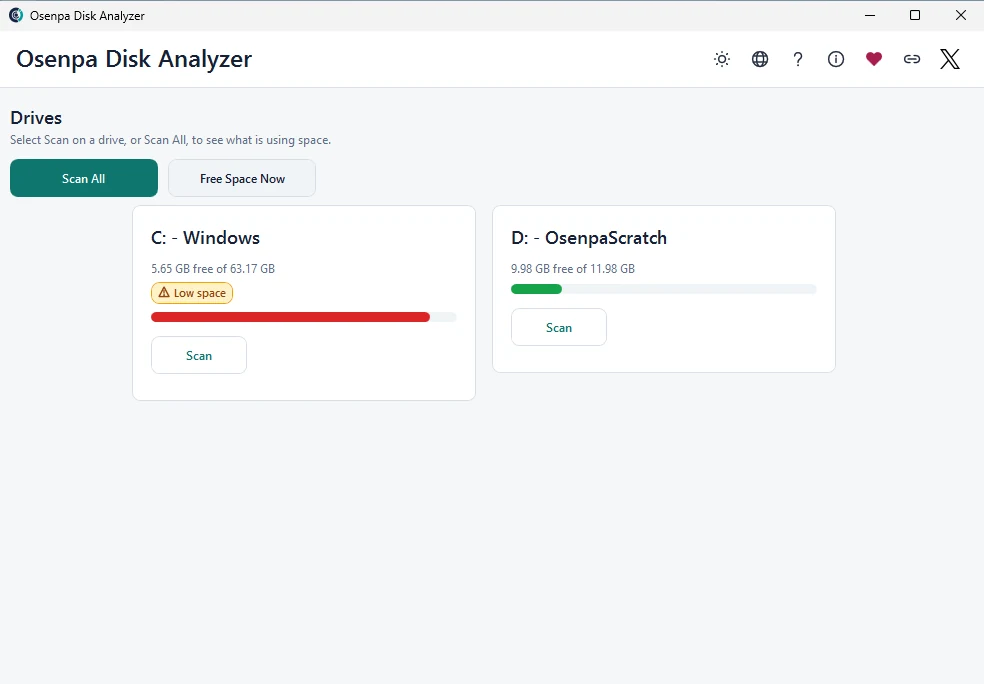
The start screen shows two test drives. Your drive names and capacities will differ.
- Drive name: choose the drive mentioned in your low-space warning.
- Free space: note this starting value; it is not a cleanup result.
- Scan: use the button on that drive's card. Free Space Now is a separate cleanup action.
-
Open the largest results
When the scan finishes, review the size-ranked tree or table. Open the Filter menu for a category, type a known file name in Search scanned names, or enter
1000in Minimum size to hide items below 1,000 MB. Use one restriction at a time so you can see what changed. -
Open the item's folder
Open the location and check the folder, owning application and date. For example,
Coastal Walk.mp4might be a recording you made. Open it from your usual media app and confirm it is the file you intended to move. A similarly large virtual-machine disk may still be needed by its application. -
Make one recoverable change
Use the owning app's uninstaller or move command when available. For your own files, copy to a different drive, open the copy to verify it, then decide whether to recycle the original. Moving within the same drive does not free capacity. Scan the same drive again and compare its free space; an item in the Recycle Bin can still occupy space.
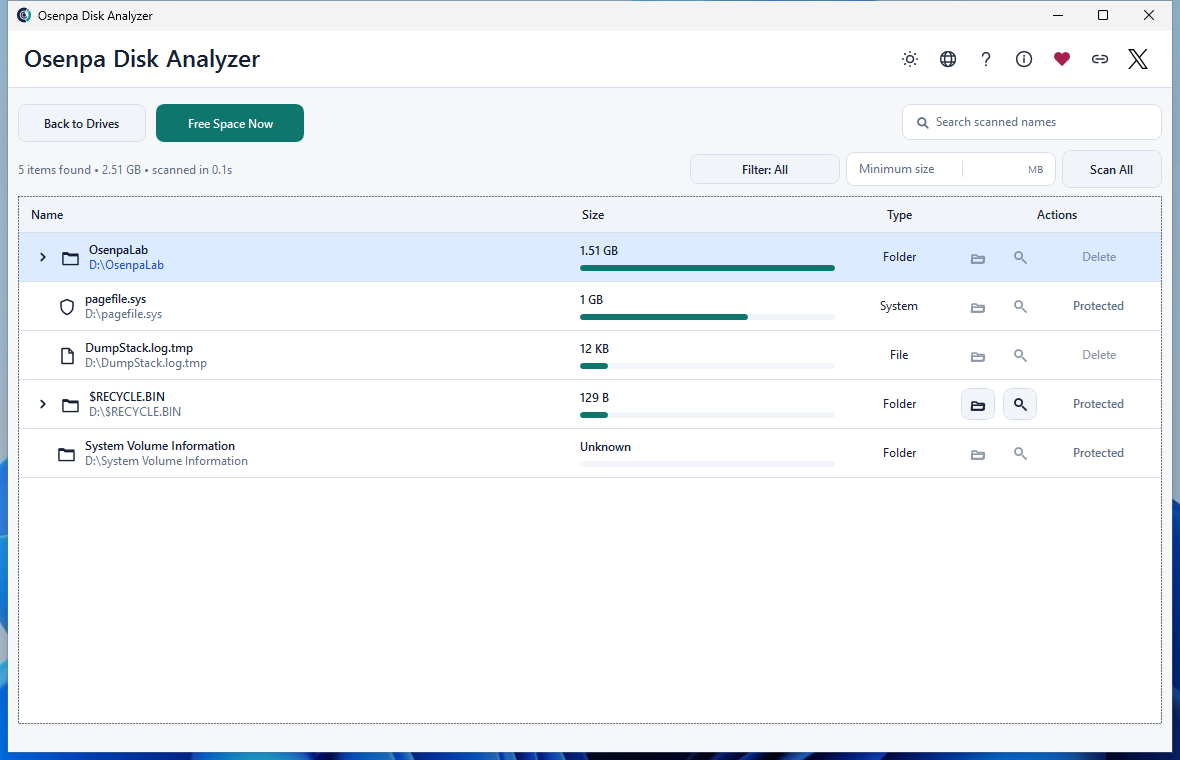
More filters and cleanup options
Match the view to the storage question
Use these options after checking the first large result. A size or age filter selects items to review; it does not decide whether they can be removed.
Scroll the table horizontally on a narrow screen.
| Need | Use | Verify |
|---|---|---|
| Largest items overall | Size-ranked result tree | Path, owner, modification date and active use |
| Old large content | Large and old filter | Items at least 1 GiB and at least 90 days old are review candidates; verify need, archive location and backup |
| Videos or archives | Matching flat filter | Copies, source files and project dependencies |
| Games | Game filter | Launcher or uninstaller removal path |
| Known name | Search by name | Narrow broad queries |
| Routine cache or temporary data | Free Space Now | Read the help text and cleanup scope before choosing it. Cleanup starts immediately and cannot be canceled in the app. |
Before changing an item
- Deleting by size alone
- Permanently removing an item without a verified backup
- Using optional online search with a private full path
- Assuming the first 2,000 displayed name matches are the complete match set
Checkpoint: Storage action checks
- The item owner and purpose are known.
- The chosen action uses Recycle Bin or another reversible method.
- A rescan confirms the intended space changed.
- When the total exceeds 2,000 matches, narrow the search and distinguish the displayed list from the full count.
If the results are empty or a size is unknown
Clear Search scanned names and the Minimum size field, then choose All in Filter. Check that you scanned the intended drive. An empty filtered list does not prove the drive is empty.
Unknown, Protected or partial results need attention before a size total can be trusted. Keep those entries in place. Reconnect a missing drive or fix a known access problem, then rescan; do not remove protection merely to make an item deletable.