
Short answer
A variable is a named value, such as text, a number, or a screen position. A subflow is a named group of steps that another part of the automation can run.
Use a variable when a value changes between runs. Use a subflow when the same tested sequence appears in more than one place.
This guide covers Osenpa Auto Clicker. Check requirements and download options before you begin.
On this page
Variables & Subflows is labeled BETA
The feature checks value types and call chains before a run. First make a short workflow work without reuse, then extract only a block that truly repeats. Keep important runs supervised.
Before the practice workflow
Prepare a disposable text field and save a profile of your existing workflow before changing Steps. Use only invented text in the practice variable, and keep the original steps available until the subflow call has passed.
Reuse one safe text-entry block
-
1. Make the plain steps work
In a harmless test window, build one click, one Type Text action and one short delay. Set Run Options to one cycle and run the three steps once. You should see the sample text entered in the intended box.
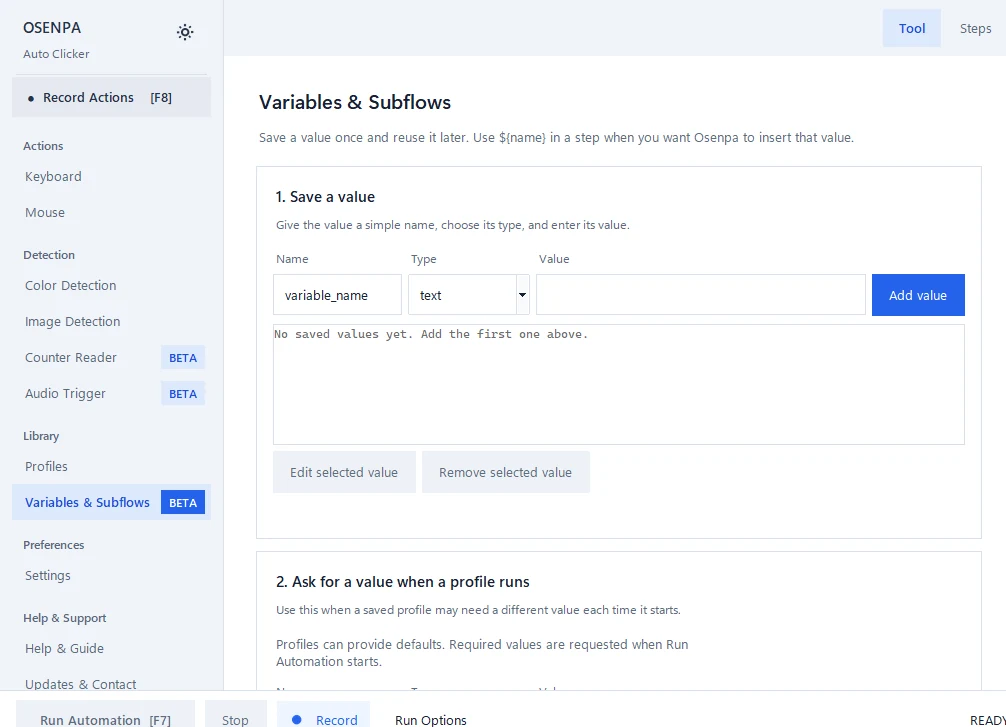
Use Save a value to create one named value before you reuse it in a step or subflow. -
2. Create one text variable
Open Variables & Subflows. Under Save a value, enter
customer_name, choose Text and enterSample Name, then select Add value. You should see the name, type and value together in the variable card. -
3. Use the variable in Type Text
Replace the sample text in Type Text with
${customer_name}. Clear the practice field, return focus to it and run the step once. You should see Sample Name in the test box. -
4. Build one subflow
With only the three practice actions in Steps, enter
Fill sample nameunder Reuse a group of steps and choose Create from current Steps. This copies the current list. Select the new subflow and inspect its steps: the click, Type text and delay should be in the same order. -
5. Add one subflow call
In Steps, use Add action, choose Call subflow and select Fill sample name. Temporarily disable the original three steps so only the call runs. Set Run Options to one cycle, clear the test field and run from the same starting window. Sample Name should appear once. Keep the disabled originals until this test passes.
Variable, parameter and subflow referenceOpen this when you need the exact difference between the three building blocks.
Understand the three building blocks
-
Variable
A variable has a name, type and value. Text stores words, Number stores a numeric value, and Coordinate keeps X and Y together. A supported field can use syntax such as
${customer_name}. -
Profile parameter
A profile parameter is a value supplied when the profile runs. It can be optional with a default or required. A required value prompts for the current run and is not silently saved as a new default.
-
Subflow
A subflow is a named group of steps. Typed arguments let the same steps use different text, numbers or coordinates without copying the action list.
Advanced subflow workflowUse this process after the first safe text-entry example works.
Turn repeated steps into a reusable subflow
-
1. Select a repeated block
After the first subflow works, choose another block used in more than one place. Keep blocks with different behavior separate.
-
2. Mark what changes
Separate values from actions. For example, a customer name is Text, a retry count is Number and a click point is Coordinate. Give each value a short name that describes its purpose.
-
3. Match each argument to its type
Use Text, Number or Coordinate as required by the receiving field. A coordinate keeps X and Y together; a number-only field rejects text.
-
4. Build the subflow
Name the reusable block by its result, such as Fill sample name, rather than by its position. Add or import the steps you checked, then define only the arguments the block actually needs.
-
5. Replace copies with calls
Add a Call Subflow action where the repeated block used to be. Map each argument to a compatible value. Test one call before replacing every copy.
-
6. Test errors as well as success
Try a missing required value and a wrong type in a harmless copy. The run should stop before input begins. Direct or indirect recursion and an overly deep call chain are also blocked before execution.
Checkpoint: test one caller first
Keep the original steps until one subflow call works with a valid value and stops safely for a missing or wrong value. Replace the remaining copies only after both paths are clear.
Rename, delete and storage behaviorHow references are kept safe.
- Renaming a variable or subflow updates references that can be changed safely.
- A referenced item cannot be deleted until its uses are removed.
- A missing subflow, wrong argument type or recursive call is rejected before the workflow sends input.
- Profiles can store the document, run options, variables, subflows and profile parameters. Treat regular profile values as local workflow data, not as a password vault.
-
A portable
.osenpaprofilefile can carry Steps, Run Options, variables, subflows, profile parameters, detector settings and supported embedded image or audio references. It is intended to move one saved profile. - Complete JSON export is a different editable workflow document transfer. Review either kind of imported workflow before running it. Follow the profile import and export walkthrough when moving a saved profile.
- Input Variation can occasionally add a short pause after a completed action. It keeps variables, subflow decisions, keys, text and click positions unchanged. See how to control these pauses.
If the call fails or enters text twice
Stop with F12 and inspect the test field before retrying. Create from current Steps copies the actions; it leaves the originals in Steps. Disable the original block while testing the call, then clear the field and run one cycle again.
For a missing value, wrong type or missing subflow error, fix the named value or call in the document before running. Keep required values and type checks intact. If the call is still wrong, disable it and re-enable the retained original steps to return to the last tested version.
Reuse mistakes
- Creating variables for values that never change
- Giving a text value to a numeric field
- Extracting a subflow before the original steps work
- Using a profile as storage for secrets
Reuse checks
- Every variable has the narrow correct type.
- Required values prompt without changing saved defaults.
- A missing or wrong argument stops before input begins.
- One subflow edit reaches every valid caller.
- Re-test every caller after changing a value type, argument, subflow or starting state.
- F12 stops a harmless test immediately.