
Short answer
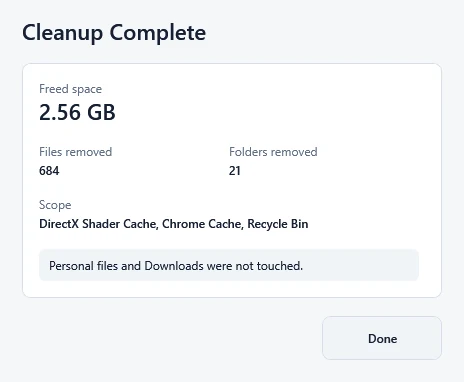
Read Freed space, the removed-item counts, Scope and any skipped-item reasons. Then compare the drive's free space before and after cleanup. The receipt counts deleted file data; Windows shows the room available on the drive.
This guide covers Osenpa Disk Analyzer. Check requirements and download options before you begin.
On this page
When to use this method
Use this guide after Free Space Now finishes to understand its result and decide whether more space is needed.
Before you start
If you have not started cleanup, first note the drive's free space in File Explorer: open This PC, right-click the drive and choose Properties. Read the Free Space Now cleanup scope before choosing that action. It starts immediately and includes the Recycle Bin.
Why totals can differ Deleted-file bytes and available drive space measure different things.
- The drive's free space
- The receipt does not measure the drive before and after. Windows stores file data in blocks, some file names can share the same data, and other apps may be writing files during cleanup. These can make the change in free space differ from the receipt's byte total.
Read what cleanup actually removed
-
Read Freed space
This value adds up file bytes from confirmed removals. Use it as the cleanup result, not as a promise that the selected drive gained exactly that much space.
-
Check the removed-item counts
Read the file, folder or privacy-entry counts shown. A count appears only when that kind of item was removed, so every receipt does not have the same rows.
-
Read Scope
Scope lists cleanup categories, not every deleted path. It can include Recycle Bin even when nothing was removed from it. Use the counts and any skip reasons to understand what happened.
-
Read skip reasons if they appear
A skipped-items section appears only when the app has reasons to report. An item may have been in use, unavailable or outside the allowed cleanup scope. Those items do not count as confirmed removals.
-
Check whether you are finished
Open the same drive's Properties and compare its free space with your earlier note. Free Space Now works across its fixed cleanup locations; selecting a drive tab does not restrict it to that drive. If you have enough room, you can stop.
Checkpoint: confirm what changed
- You read the actual result, including any skipped-item reasons.
- You compared free space on the same drive before and after cleanup.
- You know whether the remaining space is enough for your task.
If the result is zero or smaller than expected
Nothing eligible may remain. A file in use can also be skipped; save your work before closing its app. Leave protected or unfamiliar entries alone rather than trying to force their removal.
A zero result is not a reason to run cleanup again immediately. If you still need room, follow the large-file guide to review your own recordings, downloads or installed apps.