
Short answer
A visible signature is a mark that people can see on the page. It does not prove who added it or show whether the file changed later.
PDF Tools can place a visible signature. If the receiver requires verified identity or tamper evidence, use the certificate-signing process they approve.
This guide covers Osenpa PDF Tools. Check requirements and download options before you begin.
On this page
When to use this method
For a form that accepts a signature image, placement and readability are the main checks. For a certificate-signed submission, confirm the recipient's approved tool and signing order before editing the file.
What you need before signing a PDF
- The receiver's answer about which signing method they accept
- An unchanged copy of the PDF
- A signature image without unintended personal information, if a visible mark is accepted
A certificate-based signature uses cryptography and a certificate that a PDF reader can validate. A visible signature does not provide that validation.
Choose the signing method before editing
-
Ask what the receiver requires
Confirm whether a visible mark is accepted or a named certificate standard is required.
-
Use the appropriate tool
When a visible mark is accepted, open Sign & Watermark and choose Open PDF. Under What kind of mark?, choose Visible signature. Choose Image stamp and Choose image, or Text stamp for a typed mark.
You should see: the signature mark in the page preview.
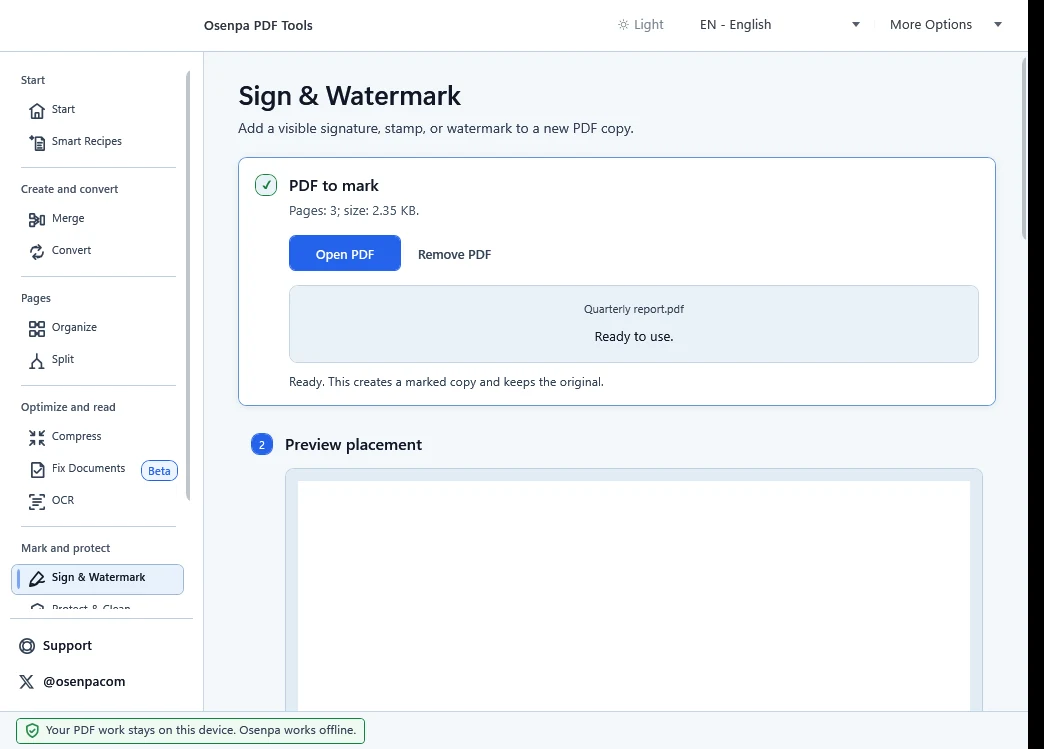
This screen adds a visible mark to a new PDF copy. It does not create a certificate-based digital signature. -
Review placement
Set Apply to to Selected pages / range and enter the intended PDF page position if the mark belongs on only one page. Check position, scale, opacity, background and nearby text in the preview.
You should see: a readable mark that does not cover important content.
-
Save and reopen the copy
Choose the output folder and filename, select Create marked copy, then open the new PDF and check the intended page. Use the receiver's approved process when a certificate is required.
You should see: the mark on the chosen page and the original PDF still unchanged.
What each signature provides
The two methods serve different requirements.
Scroll the table horizontally on a narrow screen.
| Capability | Visible signature | Certificate-based digital signature |
|---|---|---|
| Visible mark on the page | Yes | Often |
| Cryptographic signer identity | No | Yes, subject to certificate validation |
| Tamper evidence after signing | No | Yes, when correctly validated |
| Available in Osenpa PDF Tools | Yes | No |
If a reader reports that a signed PDF changed
Adding a visible mark modifies the PDF. If the source already carried a certificate signature, that modification can affect its validation state. Return to the unchanged source and follow the recipient's approved signing order. Do not describe a placed mark as certificate signing.
Signature mistakes
- Calling an image a certificate signature
- Modifying a document after a separate digital-signing step
- Assuming every recipient accepts the same signing method
Signing checkpoint
- The recipient confirmed the required method.
- After reopening the output, the mark appears on the intended page without covering important text.
- If verified signer identity or tamper evidence is required, use the recipient's approved certificate-signing process because a visible mark does not provide either one.